Discuss the various race cars in Turbo Sliders.
Moderator: Forum Moderators
-
Gzehoo
- Community User Level: 1

- Posts: 50
- Joined: Wed Aug 29, 2012 3:49 pm
-
Contact:
Post
by Gzehoo » Wed Jul 29, 2015 12:03 pm
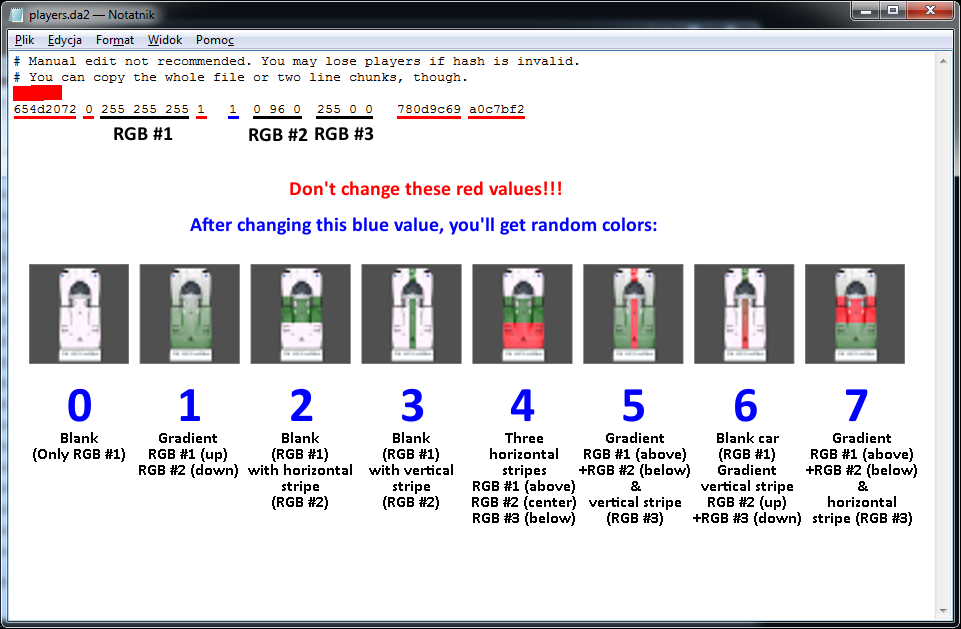
Here is my version how to change player colors in Turbo Sliders (
player.da2 file in
data directory)
Hope it's easy

All the colors can be picked from
HERE.
@admins, could you stick this topic?
Last edited by
Gzehoo on Wed Sep 25, 2019 8:50 pm, edited 2 times in total.
-
Whiplash
- Community User Level: 5

- Posts: 2325
- Joined: Sun Apr 19, 2009 4:57 pm
Post
by Whiplash » Wed Jul 29, 2015 12:45 pm
OK.

I believe we can put it as a tutorial somewhere on the "Newbie guide" tab of the
new website.
-
Gzehoo
- Community User Level: 1
- Posts: 50
- Joined: Wed Aug 29, 2012 3:49 pm
-
Contact:
Post
by Gzehoo » Tue Aug 11, 2015 9:52 am
There is also another way how to change your colors - when you're selecting your color in-game, press [Shift] [Alt] or [Ctrl] to get gradient or horizontal/vertical stripe. Of course, you can also try with pressing e.g. [Shift]+[Alt] and get three colors
-
Whiplash
- Community User Level: 5
- Posts: 2325
- Joined: Sun Apr 19, 2009 4:57 pm
Post
by Whiplash » Tue Aug 11, 2015 12:59 pm
Sure, but that's considered as a known thing. You just can't pick pure while color like that.