Discussion related to Turbo Sliders and beta version feedback.
Moderator: Forum Moderators
-
Jazzyclub
- Community User Level: 3

- Posts: 586
- Joined: Sun Nov 14, 2004 2:11 am
-
Contact:
Post
by Jazzyclub » Wed Sep 24, 2008 8:26 pm
i have some problem with my router d-link DSL-2640B
ive set the port on my router:

then scan the port:

so i check the game:

so, now tell me what the problem??
TS use TCP or UDP or something else??
-
dede
- Community User Level: 5

- Posts: 3314
- Joined: Mon Apr 10, 2006 10:29 am
-
Contact:
Post
by dede » Wed Sep 24, 2008 8:27 pm
Jazzyclub wrote:TS use TCP or UDP or something else??
Both..
-
Keppana
- Community User Level: 3
- Posts: 401
- Joined: Mon Mar 20, 2006 9:00 pm
Post
by Keppana » Wed Sep 24, 2008 8:54 pm
I've got the same problem. I think that's the ISP or router (A-Link RR24) which matters.
If personal firewall is down -> Server show as ???, still able to join.
If personal firewall is on -> Will show on list. There is another problem then, some players gets mystical "disconnected" message, totally random.
-
BongRasta
- Posts: 5
- Joined: Wed Sep 10, 2008 5:20 pm
Post
by BongRasta » Thu Oct 16, 2008 10:12 pm
I am still having issues.
I see "??" when pulling up the server. When connecting, I am able to chat & d/l track files. When races starts, it states "disconnected" and all cars stay at the starting line. The lap times of the actual race even update up top.
Any suggestions why I can chat & download, but still states disconnected?
Thanks
Cheers
-
Ande
- Game Developer
- Posts: 487
- Joined: Thu Oct 14, 2004 9:43 pm
Post
by Ande » Thu Oct 16, 2008 10:31 pm
BongRasta wrote:
Any suggestions why I can chat & download, but still states disconnected?
Two kinds of network packets are used when playing Turbo Sliders: TCP and UDP packets. TCP is used in creating the initial connection and in packets that must not be lost, like user messages, race init requests, race start messages, stats etc. But UDP traffic is used during races to rapidly update race state (server->client) and to send control messages (client->server). It seems that TCP connection is working for you but UDP packets are blocked somewhere, possibly in your firewall.
-
Guest
Post
by Guest » Fri Oct 17, 2008 1:17 am
also the ports are 6655 and 6654 open those

also i noticed that jazzy, you have the same ip eccept mine is .10* at the end not 2** or w/e
-
xzeal
- Community User Level: 3
- Posts: 445
- Joined: Sat Oct 30, 2004 10:32 am
Post
by xzeal » Fri Oct 17, 2008 6:47 am
Scorpio wrote:also i noticed that jazzy, you have the same ip eccept mine is .10* at the end not 2** or w/e
Well by that logic: OMG :O we got the same IP address 127.0.0.1!
-
Darx
- Community User Level: 1

- Posts: 36
- Joined: Fri Dec 05, 2008 8:48 am
Post
by Darx » Tue Dec 09, 2008 3:40 am
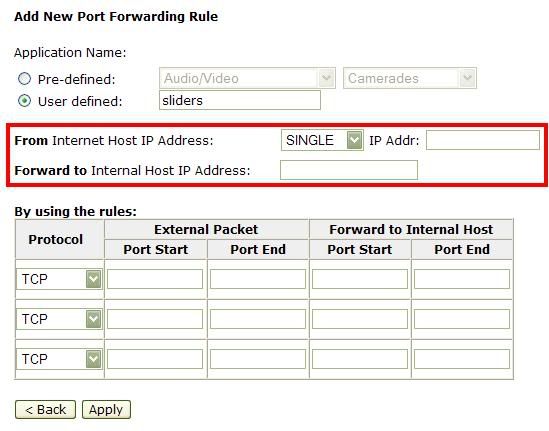
I've tried starting an autoserver several times (testing different settings) but I always end up with the "???"s. I had gone to the router and forwarded the ports 6654 and 6655 with TCP and UDP, but the IP addresses. I've tried with every IP address I can think of, but still it refuses to work.

(Look at the red square)
-
dede
- Community User Level: 5
- Posts: 3314
- Joined: Mon Apr 10, 2006 10:29 am
-
Contact:
Post
by dede » Tue Dec 09, 2008 10:57 am
From Internet Host IP Address: what are the options? Single, All? If so, select All.
Forward to Internal Host IP Address: this has to be your local IP. If it's assigned dynamically by the router (DHCP), you have to change it every time. So I suggest to use fixed local IP.
To check for your local IP, run cmd (Start->Execute->cmd) and write ipconfig.
Then set up two rules:
TCP 6654 6655 6654 6655
UDP 6654 6655 6654 6655
(or, if it's possible, just one: TCP/UDP 6654 6655 6654 6655)
Remember you might still have to add a rule to your firewall-software to allow TS being contacted through those ports.
-
Darx
- Community User Level: 1
- Posts: 36
- Joined: Fri Dec 05, 2008 8:48 am
Post
by Darx » Wed Dec 10, 2008 8:21 am
dede wrote:From Internet Host IP Address: what are the options? Single, All? If so, select All.
So I was right the first time.
Forward to Internal Host IP Address: this has to be your local IP. If it's assigned dynamically by the router (DHCP), you have to change it every time. So I suggest to use fixed local IP.
To check for your local IP, run cmd (Start->Execute->cmd) and write ipconfig.
So I was right
again.
Then set up two rules:
TCP 6654 6655 6654 6655
UDP 6654 6655 6654 6655
(or, if it's possible, just one: TCP/UDP 6654 6655 6654 6655)
So that's what TCP/UDP means. That was all right from the beginning as well.

Remember you might still have to add a rule to your firewall-software to allow TS being contacted through those ports.
I've tried this but it
still just won't work.

How do you do that with the firewall?
-
dede
- Community User Level: 5
- Posts: 3314
- Joined: Mon Apr 10, 2006 10:29 am
-
Contact:
Post
by dede » Wed Dec 10, 2008 11:31 am
Darx wrote:I've tried this but it
still just won't work.
How do you do that with the firewall?
Closing the firewall would work as well. Anyway, some providers don't offer public address by default (e.g. Italian Fastweb). I can't help more, I guess

-
Tijny
- Community User Level: 5
- Posts: 1514
- Joined: Sat Nov 06, 2004 7:59 pm
Post
by Tijny » Wed Dec 10, 2008 11:35 am
I think you're forgetting that with most (or all, not sure) routers, you can't connect to your own outside IP. If you have an autoserver on your local machine, you have to connect manually to 127.0.0.1 for it to work.
-
dede
- Community User Level: 5
- Posts: 3314
- Joined: Mon Apr 10, 2006 10:29 am
-
Contact:
Post
by dede » Wed Dec 10, 2008 12:03 pm
Tijny wrote:I think you're forgetting that with most (or all, not sure) routers, you can't connect to your own outside IP. If you have an autoserver on your local machine, you have to connect manually to 127.0.0.1 for it to work.
True

But I suggest to ask somebody to try your server: connecting to local server normally works even if it looks firewalled from the outside.
Otherwise you can run
portscans to run tests more quickly.
-
Darx
- Community User Level: 1
- Posts: 36
- Joined: Fri Dec 05, 2008 8:48 am
Post
by Darx » Tue Dec 16, 2008 4:16 am
dede wrote:Tijny wrote:I think you're forgetting that with most (or all, not sure) routers, you can't connect to your own outside IP. If you have an autoserver on your local machine, you have to connect manually to 127.0.0.1 for it to work.
True
But I suggest to ask somebody to try your server: connecting to local server normally works even if it looks firewalled from the outside.
Otherwise you can run
portscans to run tests more quickly.
Ok, just saying how it's gone.
I tried some days ago asking someone to connect to my server, so they tried, and it worked!
However, I live in New Zealand, and for others the pings get quite high. Obviously, for me there's no lag at all, which is nice for me, but it isn't the same with others. Do I have to just live with it, or is there a way to improve the situation?
-
dede
- Community User Level: 5
- Posts: 3314
- Joined: Mon Apr 10, 2006 10:29 am
-
Contact:
Post
by dede » Tue Dec 16, 2008 11:25 am
Darx wrote:However, I live in New Zealand, and for others the pings get quite high. Obviously, for me there's no lag at all, which is nice for me, but it isn't the same with others. Do I have to just live with it, or is there a way to improve the situation?
Unluckily there isn't a solution to this. Playing with over 300 ping in normal cups (nonghost) is quite hard, but still possible. You shouldn't have big problems playing in stable servers with high ping and ghost on. Most european cups (organized ones) are with ghost on, for example.
-
moerph
- Community User Level: 1
- Posts: 30
- Joined: Tue Jan 15, 2008 1:05 am
-
Contact:
Post
by moerph » Tue Dec 22, 2009 3:45 pm
I can start a server, other players can join my server BUT look at this screen:

Shyguy told me everytime the "connection attempt disconnected" appeard on screen he had some lag and not really playable..
anyone got any suggestions? I have a D-link DSL-G624T, I'm not sure how to deactivate the hardware firewall on the router, the software firewall got the sliders.exe in it exceptions.. so thanks to all of you in advance..
-
dede
- Community User Level: 5
- Posts: 3314
- Joined: Mon Apr 10, 2006 10:29 am
-
Contact:
Post
by dede » Tue Dec 22, 2009 4:26 pm
What's your OS? We have that kind of problems on the Community Server [ITA] at times.
Just for testing: start up the server, hold on and check if the messages are printed, turn off the master server and check if the messages are printed again and after a while turn on the master server and see what happens.
-
moerph
- Community User Level: 1
- Posts: 30
- Joined: Tue Jan 15, 2008 1:05 am
-
Contact:
Post
by moerph » Tue Dec 22, 2009 4:44 pm
I have windows 7 home edition... the messages appears either way... with the master server turned on or off...

-
Tijny
- Community User Level: 5
- Posts: 1514
- Joined: Sat Nov 06, 2004 7:59 pm
Post
by Tijny » Tue Dec 22, 2009 6:11 pm
moerph wrote:I have windows 7 home edition... the messages appears either way... with the master server turned on or off...
The only thing I can make of this is that someone or something is trying to connect to your TS server using some other program than TS itself. (this could for example be a port scan)
Right now I can only advise you to check your TS log files, they should show something like "Connecting from <some ip>". That may give you an indication of where those connection attempts originate from. It could be your own PC, something in your local network or, in the worst case, some machine on the outside.
-
shyguy1001
- Community User Level: 5
- Posts: 1111
- Joined: Sat Aug 29, 2009 5:35 pm
Post
by shyguy1001 » Tue Dec 22, 2009 9:01 pm
moerph wrote:I'm not sure how to deactivate the hardware firewall on the router, the software firewall got the sliders.exe in it exceptions.. so thanks to all of you in advance..
Go to this site:
http://www.myrouterip.com/
Copy and paste the address you get into your browser, you should be prompted for username and password. If you didnt set it it could be password: admin username:admin, or username:admin and no password. If you cannot find username and password then look on the bottom of your router, should be a number to ring to find it.
Once there, there should be a security tab, with firewall settings somewhere there.
-
dede
- Community User Level: 5
- Posts: 3314
- Joined: Mon Apr 10, 2006 10:29 am
-
Contact:
Post
by dede » Tue Dec 22, 2009 9:26 pm
Ugh! The IP address showed in that website most likely won't be helpful if you need to configure your router (your router is hardly configured to be accessed from the internet). You need local IP address (192.168.etc..).
-
moerph
- Community User Level: 1
- Posts: 30
- Joined: Tue Jan 15, 2008 1:05 am
-
Contact:
Post
by moerph » Wed Dec 23, 2009 12:35 pm
dede wrote:Ugh! The IP address showed in that website most likely won't be helpful if you need to configure your router (your router is hardly configured to be accessed from the internet). You need local IP address (192.168.etc..).
I entered the router with my local IP address 192.168.1.1 to open the ports 6654 + 6655... there is a firewall option, but I'm not sure what to do with it.
here my firewall page of the router.. these are the current settings, let me know if I have to change anything (or you think I should do so):

thanks
-
dede
- Community User Level: 5
- Posts: 3314
- Joined: Mon Apr 10, 2006 10:29 am
-
Contact:
Post
by dede » Wed Dec 23, 2009 2:46 pm
Nothing seems to be really important. You can make tests disabling everything, but I don't know if anything is really linked to the problem.
-
shyguy1001
- Community User Level: 5
- Posts: 1111
- Joined: Sat Aug 29, 2009 5:35 pm
Post
by shyguy1001 » Wed Dec 23, 2009 3:21 pm
dede wrote:Ugh! The IP address showed in that website most likely won't be helpful if you need to configure your router (your router is hardly configured to be accessed from the internet). You need local IP address (192.168.etc..).
Both work for me :S
-
Whiplash
- Community User Level: 5
- Posts: 2325
- Joined: Sun Apr 19, 2009 4:57 pm
Post
by Whiplash » Sun Apr 24, 2011 2:00 am
Dede, pls download COMODO firewall to your PC and analyse it a little bit for me. I'm trying to set it so it would allow me to start my own server.
You should just go to the tab "Firewall", choose "Network Security Policy", the look on the tabs: "Global Rules" and "Port Sets", then use option "add" on both of them and see what to do. I just can't figure out how to set it all up and finally get it to work. Please, install it and then explain me what to do. Maybe it will solve the problem for all other players that have it too. I'm sure that it will be just few minutes for you to understand what to do.


