Discussion related to Turbo Sliders and beta version feedback.
Moderator: Forum Moderators
-
JUHA
- Community User Level: 1

- Posts: 88
- Joined: Thu Mar 31, 2005 12:57 pm
-
Contact:
Post
by JUHA » Fri Apr 01, 2005 1:07 pm
hey. I'm trying to build a bridge to my ''Finnaroring'' track. yes, i've found those bridge tiles, and i tried to make a bridge with them.. but it didn't work. i couldn't drive under it

i know, i did something wrong.. there's something i dont know yet. please help me guys!
thanks!
-
dby
- Community User Level: 2

- Posts: 224
- Joined: Mon Mar 28, 2005 9:02 pm
-
Contact:
Post
by dby » Fri Apr 01, 2005 7:51 pm
Which tiles did you use? You have to use the ones found by pressing F3 - the ones with id 5201 and above - to make the parts you can drive under.
-
JUHA
- Community User Level: 1
- Posts: 88
- Joined: Thu Mar 31, 2005 12:57 pm
-
Contact:
Post
by JUHA » Fri Apr 01, 2005 8:11 pm
ooohhh.. i didn't know that

well thank you very much, dby !
JUHA - F1!!! Räikkönen & Kovalainen!
-
JimMiE22o2
- Community User Level: 2
- Posts: 182
- Joined: Tue Mar 08, 2005 10:45 pm
-
Contact:
Post
by JimMiE22o2 » Sat Apr 02, 2005 12:37 am
Even with the one's located in the "F3" selection, make sure they are wide enough. If not, You will have to drive perfectly in the middle. I made that mistake
Few people find what they wish to see.
Life is only to die, get over it.
-
dby
- Community User Level: 2
- Posts: 224
- Joined: Mon Mar 28, 2005 9:02 pm
-
Contact:
Post
by dby » Sat Apr 02, 2005 12:37 pm
Check out Hengari's Sliderpoint:
http://www.dhost.info/sliderpoint/index.php
He's got some really useful track making tips (I don't agree with everything 100% tho).
-
JUHA
- Community User Level: 1
- Posts: 88
- Joined: Thu Mar 31, 2005 12:57 pm
-
Contact:
Post
by JUHA » Sat Apr 02, 2005 8:39 pm
i'm already making another track, this time it's formula 1 track Bahrain..
but i have a problem, look:
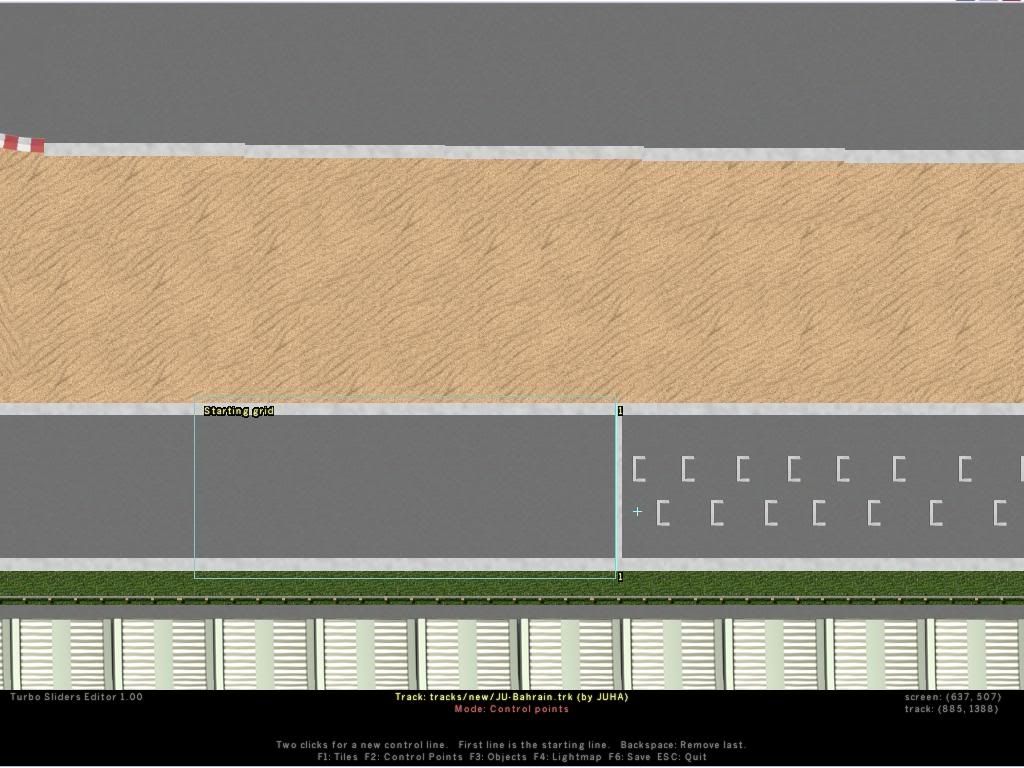
i'm making control lines, but, as you can see from the pic. it doesn't work now as i would hope
is there any way how could i make it to work?? plase? thank you!
JUHA - F1!!! Räikkönen & Kovalainen!
-
dby
- Community User Level: 2
- Posts: 224
- Joined: Mon Mar 28, 2005 9:02 pm
-
Contact:
Post
by dby » Sat Apr 02, 2005 9:19 pm
Easy!
Open the trk file in a text editor, like Notepad. Add the line
StartDirection 180
Dunno if it needs to go in a special place, but I usually put it just above "ControlPoints".
And make sure players can't miss the lines, or find usable shortcuts. In your track - I suggest putting some obsticle above the starting line - I'd put it the same distance from the track as the fence below. Then make sure that first control point stretches from the obsticle and the fence. This is always a good rule - to stretch control points from obsticle to obsticle, or screen edge. That way it can't be missed unless the player tries a shortcut.
-
Hengari
- Community User Level: 3

- Posts: 462
- Joined: Thu Nov 18, 2004 5:14 pm
-
Contact:
Post
by Hengari » Sat Apr 02, 2005 11:26 pm
JUHA wrote:
i'm making control lines, but, as you can see from the pic. it doesn't work now as i would hope
is there any way how could i make it to work?? plase? thank you!
You should really read my "Track design" -guide more carefully. There it is stated with example picture and explanation: "You can define new startdirection with adding a line "StartDirection <degrees>"." And if you read the guide carefully enough you can get some help to place every tile just like you want it and say no to those "can't rotate" -problems.
And as dby pointed, I also place that StartDirection just above "ControlPoints".
oldschool slider <3 | Hengari @ Quakenet/IRCnet
sliderpoint
-
JUHA
- Community User Level: 1
- Posts: 88
- Joined: Thu Mar 31, 2005 12:57 pm
-
Contact:
Post
by JUHA » Sun Apr 03, 2005 6:25 am
dby wrote:Easy!
Open the trk file in a text editor, like Notepad. Add the line
StartDirection 180
Dunno if it needs to go in a special place, but I usually put it just above "ControlPoints".
And make sure players can't miss the lines, or find usable shortcuts. In your track - I suggest putting some obsticle above the starting line - I'd put it the same distance from the track as the fence below. Then make sure that first control point stretches from the obsticle and the fence. This is always a good rule - to stretch control points from obsticle to obsticle, or screen edge. That way it can't be missed unless the player tries a shortcut.
yes, dby... the track ISN'T ready yet. of course i will make some obstacles etc. thanks for help man! i'm going to try it now.
and also thanks Hengari.
EDIT: hmm.. i edited the .trk file as you said.. but still it didn't work
JUHA - F1!!! Räikkönen & Kovalainen!
-
Jazzyclub
- Community User Level: 3
- Posts: 586
- Joined: Sun Nov 14, 2004 2:11 am
-
Contact:
Post
by Jazzyclub » Sun Apr 03, 2005 7:05 am
you need put "StartDirection 180" after the row include tiles.til
-
JUHA
- Community User Level: 1
- Posts: 88
- Joined: Thu Mar 31, 2005 12:57 pm
-
Contact:
Post
by JUHA » Sun Apr 03, 2005 8:57 am
now it's working... lol, why i didn't test it immediately after i edited the trk file

well now i should make it to look good with those start positions
JUHA - F1!!! Räikkönen & Kovalainen!


