
Tiles for tracks
Now that you know how to make a decent Turbosliders track you can enhance your track with custom tiles. The files tiles.til and terrains.ter in the data directory contain information on how to create your own terrain and tile files.
How to make new tiles
There are some "good to know" things in making new tiles.
You can start making your custom tile by drawing some nice image first and then making the appropriate pattern-file for that image. The pattern-file image must have half the size of the corresponding image in the image-file. There isn't much to tell about making the actual image. Just use free graphichs or draw it yourself. Do not steal some graphics from other games.
I'm using The Gimp for making new graphics. The Gimp is the GNU Image Manipulation Program. It is a freely distributed piece of software for such tasks as photo retouching, image composition and image authoring. It works on many operating systems, in many languages.
The real problem when creating new tiles, in my opinion, is the pattern-file and making the image's colors indexed. The color id in the pattern must match the id defined in the terrains.ter if you are using predefined terrains (such as bridge). When you get the idea of images colormap and id numbers it's very easy to make your own tiles.
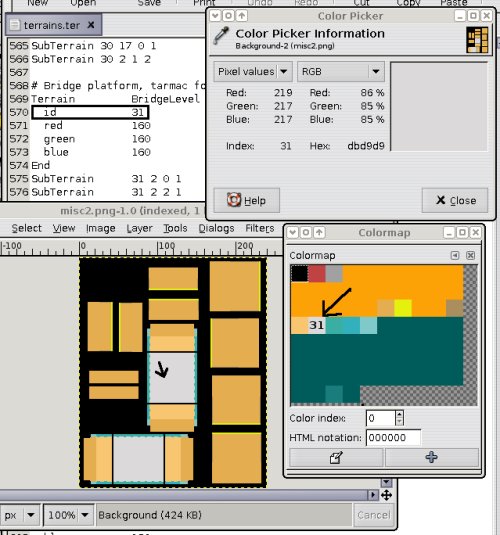
Only use file extensions trk, til and ter for data files and basic image extensions (png, gif, jpg, jpeg) for images. Otherwise, the other people may not be able to automatically download the tracks from a server.
How to use custom tiles in a track
You can use custom tiles in your track by adding TileDefinition line to the tracks .trk -file. I assume that you have read the documents for making own tiles from TS's doc-folder, so this is just for making things clear. You can also look from .trk files (hg_Tunnelhell.trk or hg_Wintersport.trk) how I have defined my tiles.
Add your definitions like this:
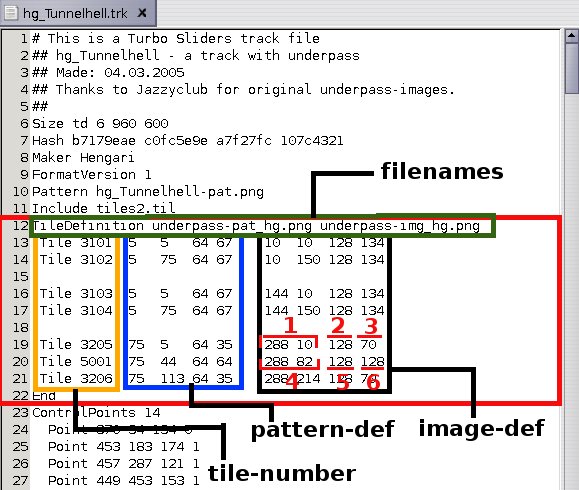
As you can see, on the first line there is the pattern and image-files names.
- The orange section shows your tiles numbers (use numbers that don't mixup with default tiles).
- The blue section shows the image definitions for the pattern-file ( <x> <y> <width> <height> ).
- The black section is for the definitions of the image-file ( <x2> <y2> <w2> <h2> ) and its <w2> and <h2> values are two times the values as in the pattern definitions.
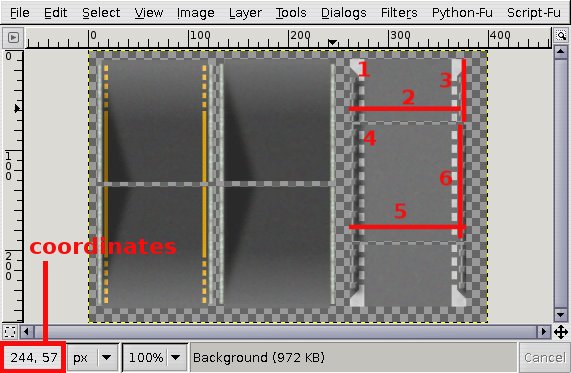
The values for those definitions you can get by using for example GIMP and looking the bottom left corner when pointing something in the picture.
- For that image definition <x2> you point the place where the 1 is and look the coordinates.
- Measure the width of 2 and height of 3 for <w2> <h2>
- Do the same things for 4, 5 and 6
Distributing your track
As it reads in the "README-editor.txt": "If you have used your own tiles or other non-standard data files, pack your files so that when they are unpacked, they are unpacked in a directory. If you have included your own tiles or graphics, include a README.txt file which tells how the tracks are used (simple unpacking instructions) and if it is ok to for other people to use/modify/distribute/sell those tiles or graphics. Tracks are also automatically transfered to other players, if you host a server with your tracks.